Every push to the main branch of the ScreenshotOne dashboard goes through our CI pipeline, which builds and deploys it. That happened 80 times in the last 30 days, and each run took about four minutes: the last five on the old setup took between 3 minutes 38 seconds and 4 minutes 10 seconds.
The latest one took 53 seconds:
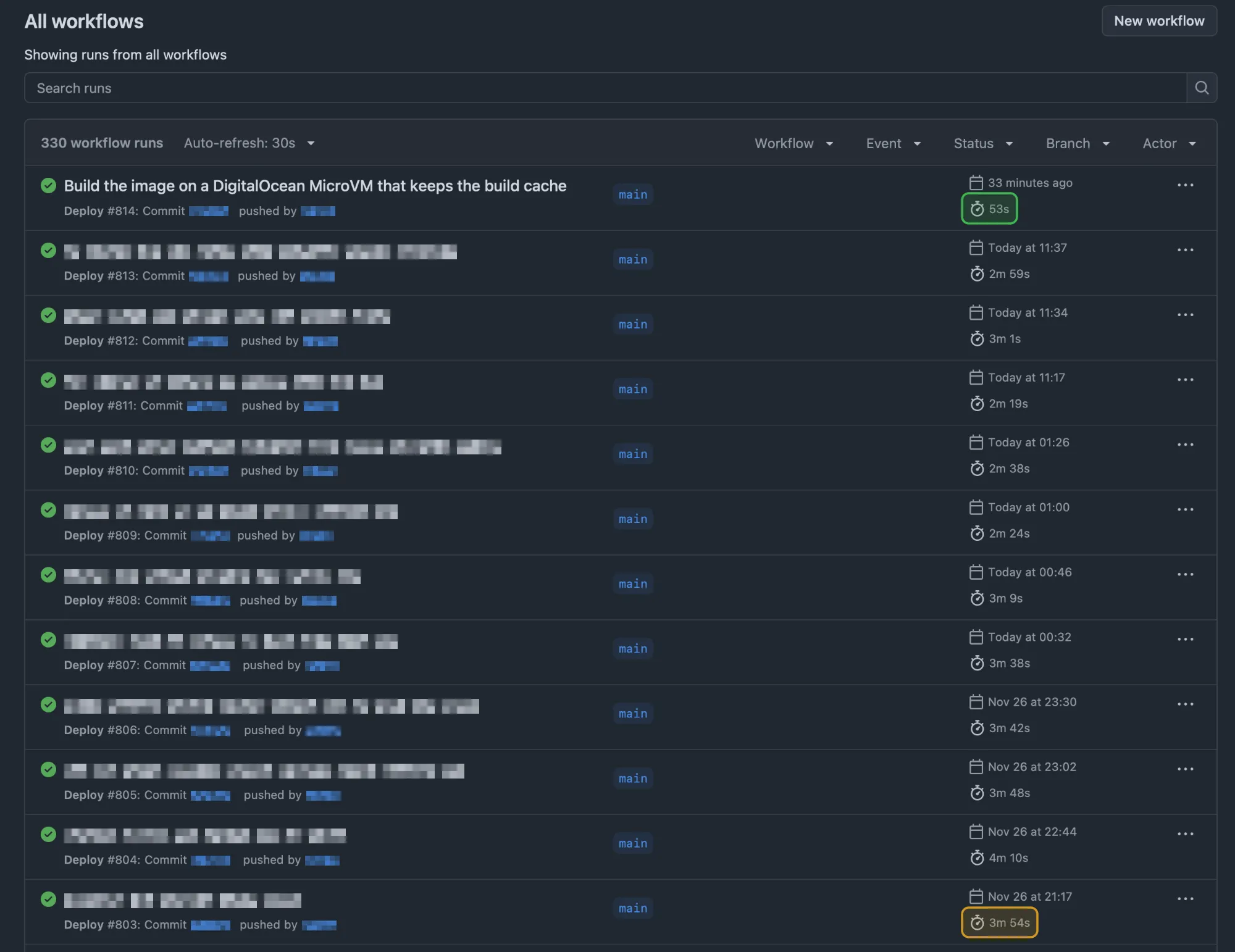
Four minutes is not a disaster. But it is long enough to lose the thread and too short to start anything else, and at 80 deploys it adds up to more than five hours of waiting a month.
Fast CI matters for more than my patience, though. A fix cannot reach our customers faster than the pipeline runs. A slow pipeline also tempts you to batch changes, and big batches are riskier and harder to debug than small ones. The shorter the loop between making a change and seeing it live, the smaller and safer each change gets.
So I took one deploy apart, second by second, and removed what I could.
The biggest boost did not come from a clever trick. It came from moving the build off the standard GitHub runner to a more capable machine that keeps its cache. So if your builds are slow, consider that too: a larger runner, a build server, or a sandbox like the one I ended up with.
This post covers every step, in the order I took them, with the numbers for each.
The setup
Our dashboard is a Next.js application with Prisma. It is built with Turbopack and shipped as a Docker image.
The pipeline around it is short:
- GitHub Actions runs a workflow on every push to the main branch.
- The workflow builds the Docker image and pushes it to our container registry on DigitalOcean.
- Kamal pulls the image on our DigitalOcean server, starts the new container next to the old one, and switches the traffic over once the new one is healthy.
One workflow, one image, one deploy tool. That keeps deploys simple, and it also means that the deploy time is the sum of what this one workflow does.
Where the four minutes went
Here is one 228-second deploy, phase by phase:
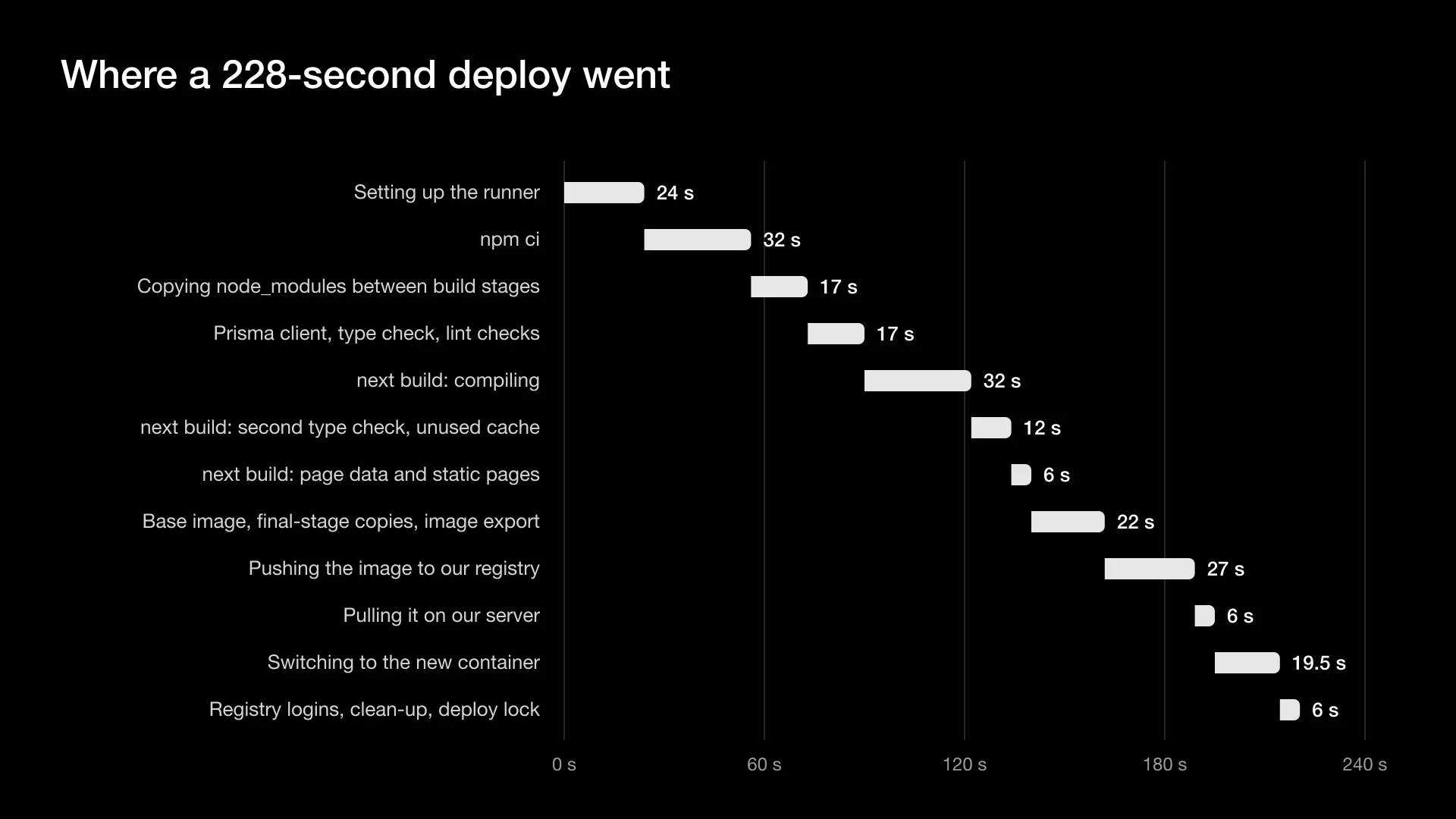
Two things stand out.
First, nothing is cached. A GitHub-hosted runner is a new machine every time, so every deploy installs every dependency and compiles every file again.
Second, a good part of the work produces nothing that anyone uses. That is the cheapest part to fix, so I started there.
Step 1: remove the work that buys nothing
None of this needs a cache or a new machine.
One build stage instead of two
Our Dockerfile had the classic layout: a deps stage installed the dependencies, and a builder stage copied them over. That copy moved 1.3 GB of node_modules on every build, which took 17 seconds. Installing and building in the same stage needs no copy:
FROM base AS builderWORKDIR /app
COPY package.json package-lock.json ./RUN --mount=type=cache,target=/root/.npm npm ci
COPY . .RUN --mount=type=cache,target=/app/.next/cache npm run buildThe two --mount=type=cache lines do nothing on a runner that forgets everything. They matter later.
Check the types once
npm run build ran tsc --noEmit, and then next build checked the types a second time. Now next typegen runs first, so tsc sees the generated route types too:
"build": "prisma generate && next typegen && tsc --noEmit && next build"And Next.js skips its own pass:
const nextConfig: NextConfig = { typescript: { // `npm run build` runs `next typegen` and `tsc` before `next build` ignoreBuildErrors: true, },};This is only safe as long as tsc stays in the build script. Without it, nothing checks the types at all.
Do not write a cache that nobody reads
During that second type check, Next.js also wrote a Turbopack build cache to .next/cache. On a runner that is thrown away a minute later, nobody ever reads it. Now it is written only where the next build will find it:
experimental: { turbopackFileSystemCacheForBuild: process.env.NEXT_BUILD_CACHE !== "0",},The second type check and the cache together cost 12 to 17 seconds per deploy.
Ship a smaller image
Our image contained the Prisma client twice, and each copy carried a query engine for macOS that a Linux server never loads. That was about half of what every deploy pushed. Without the duplicates, the image went from 353 MB to 290 MB.
I also moved the dependencies into a layer of their own, before the application code. A builder that keeps its cache reuses that layer, and then a deploy pushes and pulls only the small layers with the code.
After these changes, pushing the image took about 4 seconds instead of 27.
Cache the deploy tool, drop the dead steps
Our workflow ran gem install kamal on every run. With a Gemfile and a lockfile, ruby/setup-ruby caches it, and the step takes 4 seconds.
The workflow also set up a Buildx builder that Kamal never used. That was 9 seconds for nothing.
Step 2: switch containers without waiting
Kamal 1 switched containers through Traefik with fixed waits: 5 seconds after the new container is healthy, 5 more after the old one stops answering, plus the polling in between. Getting from “the new container is up” to “the old one is gone” took 19.5 seconds.
Kamal 2 replaced Traefik with kamal-proxy, which sends requests to the new container as soon as its health check passes. The switch now takes about 4 seconds, and in my tests not a single request failed during it.
After steps 1 and 2, a deploy took between 2 minutes 19 seconds and 3 minutes. That was better, but the build still took two minutes of it, because the runner still started from nothing.
Step 3: do not deploy what does not change the image
The fastest deploy is the one that does not run. A push that only touches tests, lint settings or notes changes nothing in the image, so it no longer starts a deploy:
on: push: branches: - main paths-ignore: - "README.md" - "vitest.config.ts" - "**/*.test.ts" - "**/*.test.tsx"The wall: a runner that forgets everything
In the last deploy on that pipeline, Kamal needed 156 seconds, and 133 of them went to docker buildx build. No further tuning of the Dockerfile fixes that. The build needs a machine that still has yesterday’s layers, the npm cache and the Turbopack cache.
I looked at four ways to get one:
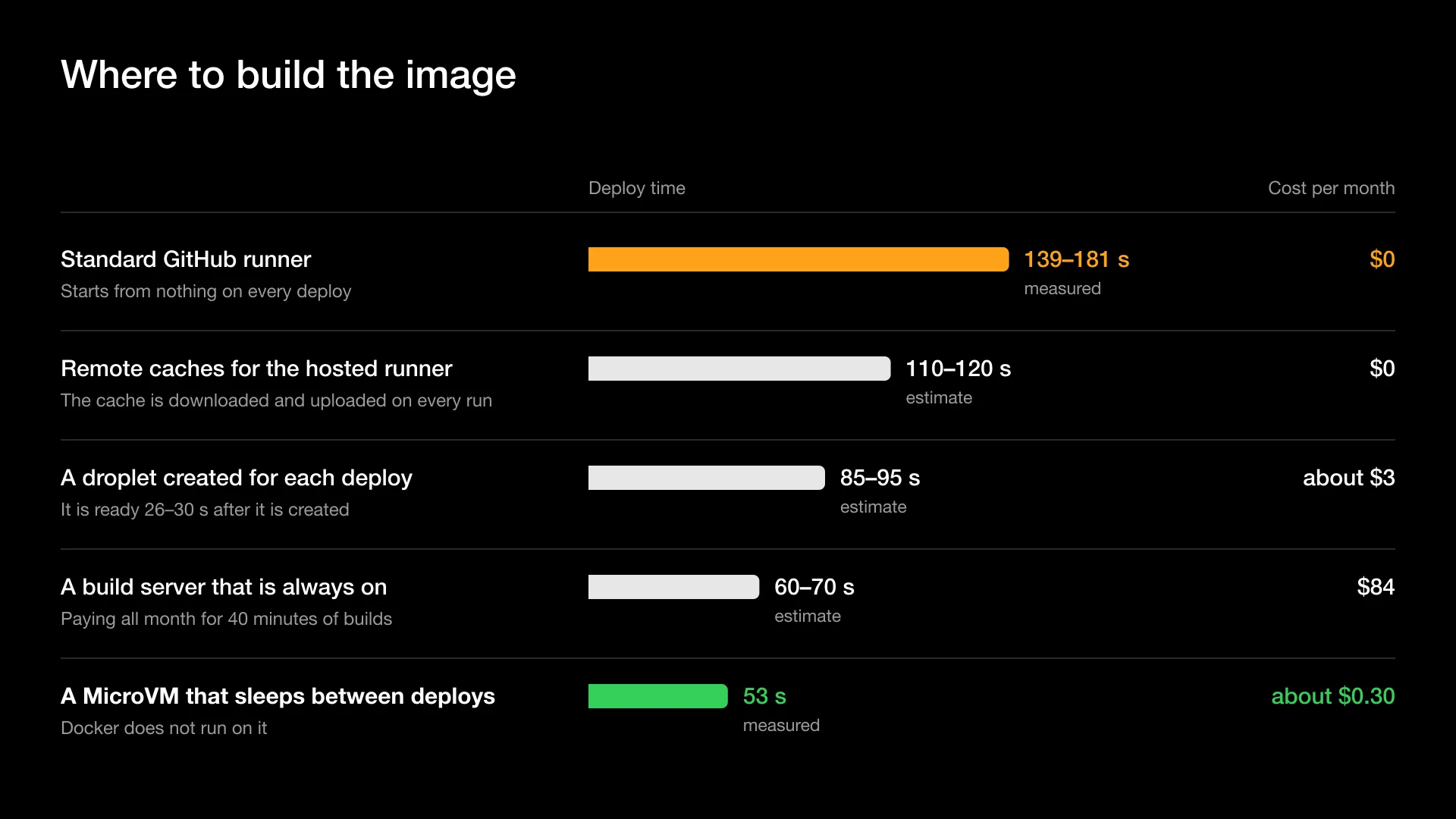
The times of the three options I did not build are estimates from tests. With a build server that is always on, for example, Kamal’s part took 44 to 49 seconds in a rehearsal.
The last one won.
Step 4: build on a machine that sleeps
DigitalOcean has MicroVMs.
A MicroVM is a sandbox: a small virtual machine with its own kernel that runs one container image. Sandboxes were made for AI agents and for running code you do not trust, where a machine works in short bursts and then sits idle. So a sandbox pauses when it is idle and resumes on the next request, with its memory, files and processes intact, and CPU and memory are billed only while it runs.
Using one is simple. You create it from a container image and then talk to it through an API: run a command, upload or download a file, pause, resume.
Short bursts of work and long idle periods are also the life of a build machine. So I measured the part that matters: a paused MicroVM answered a command in 0.8 to 1.1 seconds, even after a 7-minute pause, with everything still in memory.
That is a build machine that costs next to nothing while I am not deploying and is warm when I am.
A MicroVM is not a GitHub Actions runner, though. Our workflow still runs on a GitHub-hosted runner, which hands the image build to the MicroVM and does everything else itself: it uploads the commit, waits for the image and runs Kamal.
DigitalOcean is not the only one that sells sandboxes. boat, E2B, Daytona and Modal do too, and I compare one of them, boat, further down. But I had one more reason to pick DigitalOcean: our infrastructure is already there. I see no reason to move a part of it somewhere else, and I prefer to keep things in one place.
Using a MicroVM as a build machine meant solving four problems.
Docker does not run there, but BuildKit does
The documentation says it plainly: MicroVMs do not support Docker-in-Docker. The container may not mount anything and has no cgroup file system.
But BuildKit, the engine behind docker build, runs without Docker. It needs a user namespace, where mounting is allowed, and rootless settings:
unshare --user --map-users=all --map-groups=all --mount --cgroup sh -c ' mount -t cgroup2 none /sys/fs/cgroup mount -t tmpfs -o size=8g,mode=700 tmpfs /var/lib/buildkit exec buildkitd --rootless \ --oci-worker-binary=/usr/local/bin/runc-rootless \ --oci-worker-no-process-sandbox \ --oci-worker-snapshotter=overlayfs \ --oci-worker-net=host \ --root /var/lib/buildkit'runc-rootless is a two-line wrapper that calls runc --rootless=true. Without it, runc stops at the cgroup’s device rules.
This is not a documented way to use a MicroVM. It works today and may stop working one day, which is one more reason for the fallback described below.
The cache lives in memory
A MicroVM’s disk is an overlay, and BuildKit cannot put its own overlay on top of one. With the snapshotter that copies every layer instead, a build took 39 to 70 seconds, and three builds left 18 GB on the disk.
So BuildKit’s folder is a tmpfs: the layers are kept in memory. That sounds fragile, but it is exactly what a MicroVM is good at, because a pause keeps the memory. The cache does not survive a restart of the MicroVM, though. After one, a single build starts from nothing, installs BuildKit again by itself, and takes 70 to 85 seconds.
No SSH, and 40 seconds per command
Kamal can build on another machine over SSH. A MicroVM has no SSH. What it has is DigitalOcean’s API: upload a file, run a command.
So the workflow uploads the commit as a 1.2 MB archive and starts the build with one command. A command has 40 seconds to finish, so the build runs in the background, and the workflow asks for its state until it is done.
The build gets no keys worth stealing
In this setup, build steps are less isolated from the build machine than they are with Docker. So we treat that machine as untrusted and keep nothing valuable on it.
Our image is built without a single secret: the build gets the public values and a placeholder for each secret, and the container gets its real environment from Kamal when it starts.
For the push, the MicroVM gets a token for our registry that can write to one repository and expires in 15 minutes. The registry’s token endpoint issues it:
curl -u "$DIGITALOCEAN_TOKEN:$DIGITALOCEAN_TOKEN" \ "https://api.digitalocean.com/v2/registry/auth?service=registry.digitalocean.com&scope=repository:my-registry/my-app:pull,push"BuildKit accepts it as a registrytoken in a Docker config file. That short-lived token, scoped to a single repository, is the only credential the MicroVM ever sees.
The workflow
The build starts right after the checkout and runs while the runner installs Ruby and Kamal:
- name: Start building the image on the MicroVM run: | nohup bash scripts/microvm-build.sh "$MICROVM" "$RUNNER_TEMP/result" > "$RUNNER_TEMP/build.log" 2>&1 &
# Ruby, Kamal, the registry login: about 10 seconds
- name: Wait for the image id: image continue-on-error: true run: | while [ ! -e "$RUNNER_TEMP/result" ]; do sleep 0.2; done cat "$RUNNER_TEMP/build.log" if [ "$(cat "$RUNNER_TEMP/result")" = 0 ]; then echo "built=true" >> "$GITHUB_OUTPUT" fi
- name: Deploy env: IMAGE_BUILT: ${{ steps.image.outputs.built }} run: | if [ "$IMAGE_BUILT" = true ]; then bundle exec kamal deploy --skip-push --version "$GITHUB_SHA" else bundle exec kamal deploy fiThe script reports success only when our registry serves the image it built under the commit’s tag. After any other outcome, Kamal builds the image on the runner, as it did before. The MicroVM can make a deploy faster, but it cannot break one.
I tested the unhappy paths before trusting it. A commit that does not compile fails in 7 seconds with the compiler’s message. A build that hangs is stopped at the time limit and pushes nothing. A MicroVM that is gone fails in 1.5 seconds.
More cores help, but only up to a point. On droplets, going from 4 to 8 dedicated vCPUs cut the build step from 28 seconds to 19. On MicroVMs, 16 vCPUs were slower than 8: the build step took 21 to 25 seconds on 16 and 13 to 18 on 8, measured side by side on the same day. Our MicroVM has 8.
The result
The first deploy on the new pipeline took 53 seconds from push to done:
| Part | Seconds |
|---|---|
| Image built and pushed on the MicroVM, while the runner set up Kamal | 28 |
| Kamal: pulling the image, starting the container, switching | 15 |
| Deleting old images, starting and ending the job | 10 |
Inside those 28 seconds, npm ci came from the cache, the build step took 17 seconds and the push 4.
There is more to gain. A lint tool inside npm run build takes about 10 of those 17 seconds, and it does not have to run inside the image build. Moving it out should bring a deploy to about 43 seconds.
What it costs
A MicroVM costs $0.022 per vCPU and $0.0085 per GiB of memory for each hour it runs, billed by the second. For 8 vCPUs and 16 GiB, that is $0.312 an hour. While paused, it costs only its disk: $0.05 per GiB per month.
A deploy keeps it running for about 30 seconds, which costs about a quarter of a cent. At 80 deploys, that is about 30 cents a month, including the disk and the traffic. That number comes from the price list. The first invoice with a MicroVM on it has not arrived yet.
Alternatives to DigitalOcean MicroVMs
A MicroVM is not the only way to get a build machine that is ready in a second. Other sandbox providers sell similar machines, and several companies sell faster runners for GitHub Actions.
I looked closely at one of them, boat. It sells sandbox machines for AI agents, with SSH and Docker inside. By the hour it is much cheaper than a MicroVM: $0.072 for 8 vCPUs and 16 GB, against $0.312.
For this job, it would still cost us more. I did not run a build there; what follows is from their documentation as of November 27, 2026.
The smallest plan is $20 a month. It is not a fee: the $20 comes back as VM time. But our builds would use about 20 cents of it, and the rest expires at the end of the month. Their pricing page says it openly: “Below about $20 of use a month, providers with a $0 plan or free credits cost less.”
There is no pause. In their words: “A stop removes the virtual machine and keeps a copy of the disk.” Docker’s build cache is not on that copy. They document a way to keep the image layers, by exporting BuildKit’s cache into the home folder. But the cache mounts of a build are not part of such an export, and those hold the npm cache and the Turbopack cache, which is what turns a 15-second compile into a 1-second one. To have everything warm on every deploy, the machine has to stay on, and that is $52.56 a month for 8 vCPUs.
It runs in Europe only: Germany, Finland and France. Our registry is in New York.
So it is 30 cents against 20 to 53 dollars a month. The comparison flips for a machine that works a lot: above about 64 hours of running time a month, boat’s $20 plan is the cheaper one. A build machine that works 40 minutes a month is the opposite case, and what it needs is not a low hourly price but a pause that keeps the memory.
For the other alternatives, runners/bench is a good place to start. It benchmarks GitHub Actions runner providers, boat among them, side by side, by speed and by cost.
What I would do again
- Measure one deploy phase by phase before changing anything. Half of what I removed was invisible until it had a number next to it.
- Remove work before caching it. The copy between stages, the second type check and the unused cache cost nothing to delete.
- Give the cache a home that outlives the job. No setting makes a build fast on a machine that starts from nothing.
- Keep the slow path. Every new piece falls back to the old way of building, so the worst case is the deploy we had before.