Reduce proxy bandwidth with host bypasses

Load selected hostnames directly with proxy_bypass_hosts to reduce custom proxy bandwidth usage.

Changelog1 min read

Written by

Dmytro Krasun

Published on

You can now use proxy_bypass_hosts together with a custom proxy to load selected hostnames directly instead of routing them through the proxy.
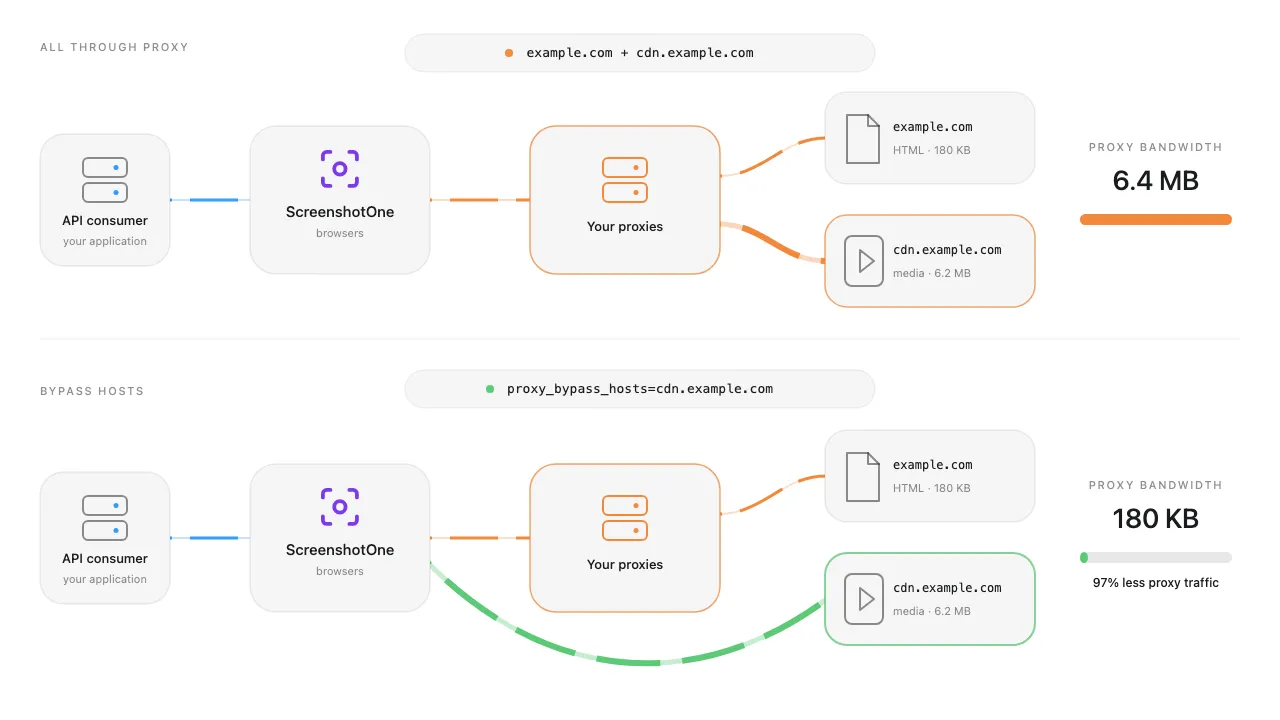
Proxy bypass hosts reduce custom proxy bandwidth

This is useful when large static resources such as images, videos, fonts, or scripts must load for the screenshot but do not need the proxy IP address or location. Other requests continue through the configured proxy, and bypassed requests are not blocked.

Start with the highest-bandwidth hostnames reported by your proxy provider and verify that the rendered result remains correct after each change.

Read how to reduce proxy bandwidth to learn how to combine host bypasses with request blocking, resource blocking, caching, and selective proxy retries.


Read more product updates

New features, bug fixes, and optimizations...

View all product updates
Hosted ScreenshotOne MCP server is now available

Hosted ScreenshotOne MCP server is now available

Connect your AI agents to ScreenshotOne through the hosted MCP server with OAuth. No local server or copied API key is required.

Read more

1 min read

Fixed a validation issue in the playground

Fixed a validation issue in the playground

We fixed a validation issue in the ScreenshotOne playground caused by selector scroll into view.

Read more

1 min read

Error metrics in the dashboard

Error metrics in the dashboard

You can now see error metrics in the dashboard to quickly understand what errors are happening and how often.

Read more

1 min read

Automate website screenshots

Exhaustive documentation, ready SDKs, no-code tools, and other automation to help you render website screenshots and outsource all the boring work related to that to us.