How to Unblock ScreenshotOne in Cloudflare
If your website is protected by Cloudflare and ScreenshotOne requests are blocked by Firewall Rules, Bot Protection, or Challenges, you can allow only your screenshot requests by creating a secure allow rule based on a secret User-Agent or custom header.
The following guide shows how to unblock ScreenshotOne in Cloudflare to bypass:
- Bot Fight Mode;
- Managed Challenge;
- JS Challenge;
- WAF Firewall rules;
- Security level restrictions.
Without disabling security for everyone.
Choose a secret User-Agent or header
Instead of using a public User-Agent like:
ScreenshotOneBotUse something unguessable, for example:
MyCompanyScreenshotBot/9f3aXK29_secretTreat this as a secret API key.
Or send a custom HTTP header with the secret value:
X-Screenshot-Secret: k29Fj3l2_very_secret_valueThe idea is to make sure nobody can guess it bypass your challenges.
2. Send it from ScreenshotOne
When using ScreenshotOne, send it as:
https://api.screenshotone.com/take?access_key=<your access key>&url=https://example.com&headers=user-agent:<my-custom-user-agent>Or if you are sending POST requests with JSON:
{ "headers": ["user-agent:<my-custom-user-agent>"]}3. Create a Cloudflare Firewall Rule
Open Cloudflare Dashboard and:
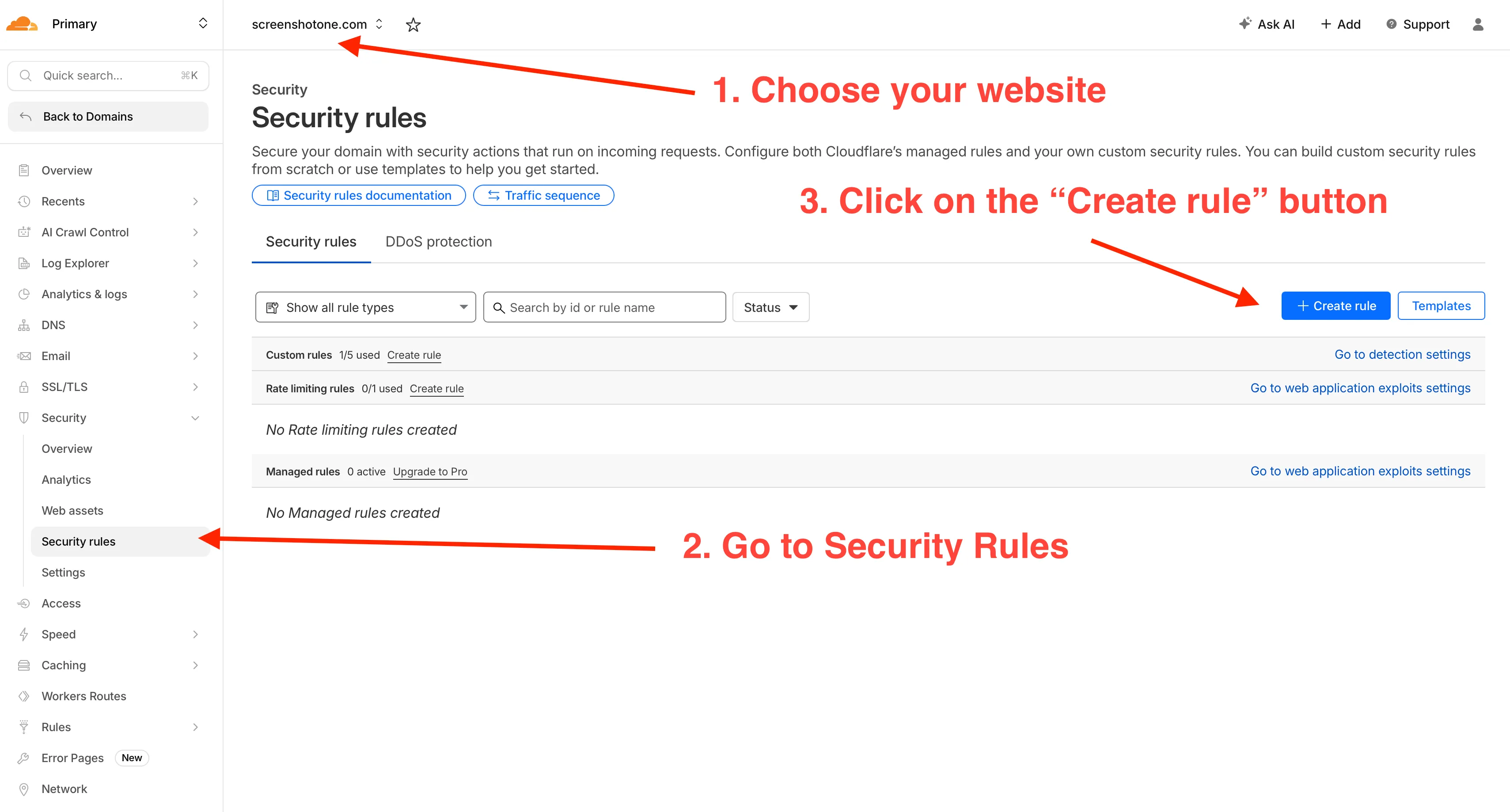
- Choose your website from the list.
- Go to Security → Security Rules.
- Click Create rule.
Name the rule as Allow ScreenshotOne API or similar. The rule expression should be:
(http.user_agent eq "MyCompanyScreenshotBot/9f3aXK29_secret")Or if you are using a custom header:
(any(http.request.headers["x-screenshotone-secret"][*] eq "k29Fj3l2_very_secret_value"))The action should be Skip and choose to skip:
Then choose to skip:
- All WAF rules
- All Rate limiting rules
- All Managed rules
- Browser Integrity Check.
- All Super Bot Fight Mode Rules.
- And everything related to the challenges.
Save the rule.
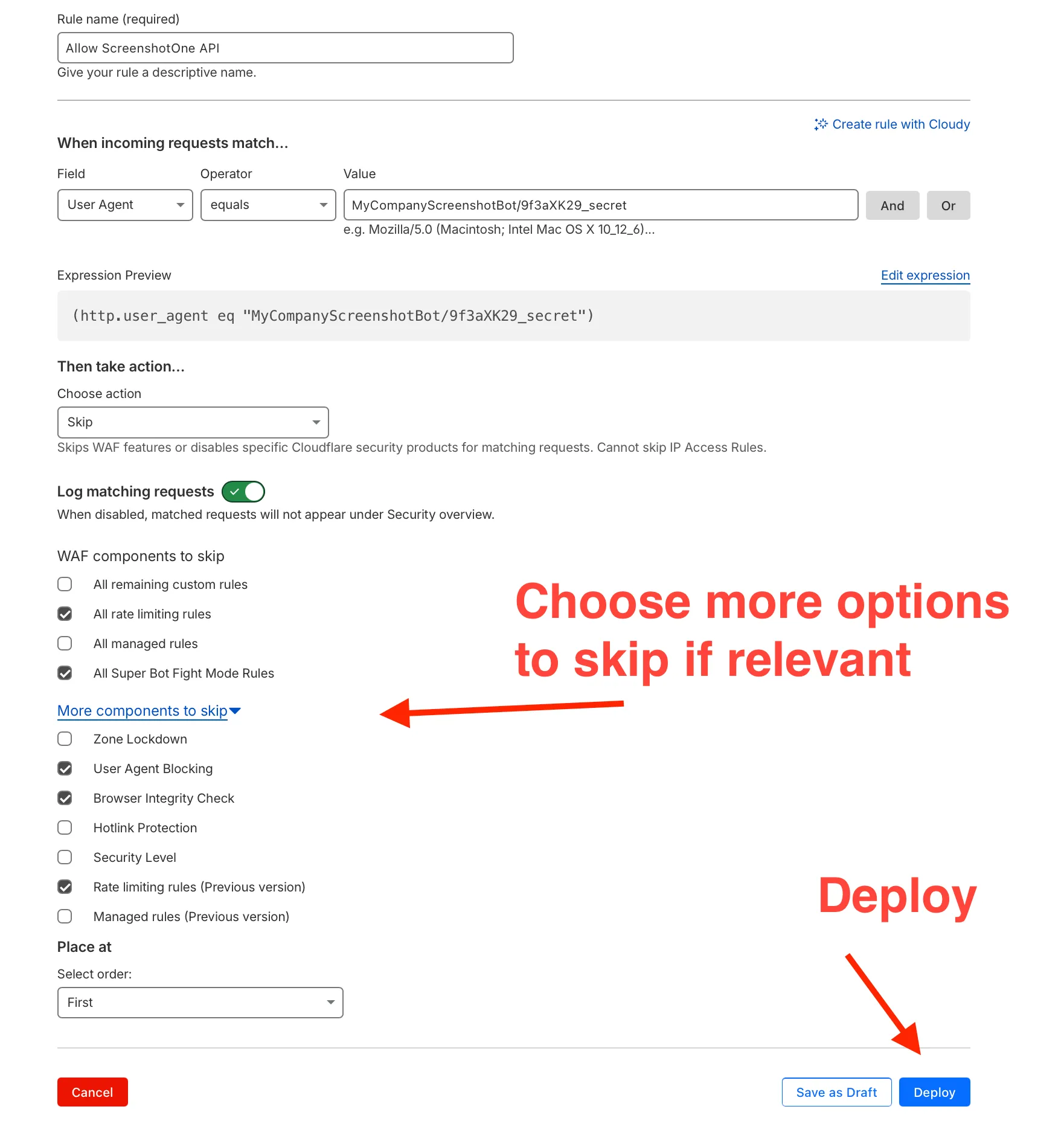
You might need to play a bit with it to make it work. By checking the events and the rule details.
Most issues usually arise from what you are skipping or if you have any other results that block the request.
Testing
After setting rule:
- Trigger screenshot request.
- Check Cloudflare → Security → Events.
- Confirm action shows Skipped.
If it still blocks:
- Move rule higher;
- Ensure expression matches exactly;
- Verify header capitalization.
Best Security Practices
1. Treat User-Agent or Header as a Secret
Do not:
- Expose it publicly
- Commit it to GitHub
- Use simple values like
screenshot-bot
Generate something random and long.
2. Rotate Secret Periodically
Change it occasionally like you would rotate API keys.
3. Use Rate Limiting
Even if bypassing challenge:
- Keep rate limits active
- Protect login and admin routes separately
Summary
This allows ScreenshotOne to bypass Cloudflare challenges securely without weakening your website security.
In case you encounter any issues, please, reach out at support@screenshotone.com and we will be happy to help.